Use Windows shortcuts on Mac
Ctrl2Cmd lets you keep using familiar shortcuts like Ctrl+C, Ctrl+V, Ctrl+Z and Ctrl+A on macOS, without retraining your muscle memory.
One-time purchase. No subscription.
What problem it will solve
The problem is simple: your hands remember Windows shortcuts, but macOS expects Command instead of Ctrl. That mismatch breaks copy, paste, save, undo, and a bunch of other everyday habits.
Ctrl2Cmd solves that by letting your familiar Ctrl-based shortcuts trigger the Mac actions you already expect, so you spend less time translating between systems and more time getting work done.
Windows to Mac Copy Paste Shortcuts
If you're switching from Windows to Mac, here's how copy and paste shortcuts change:
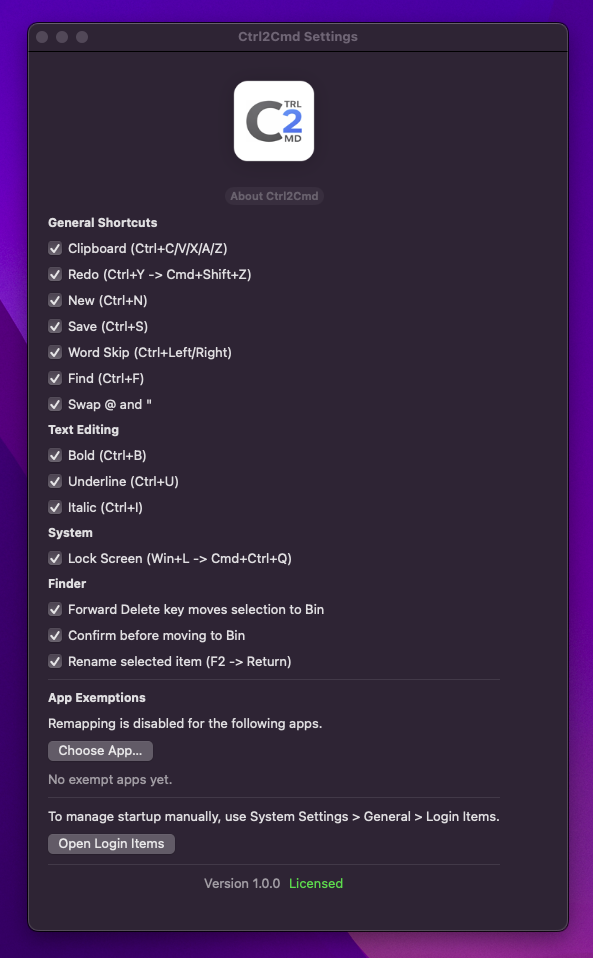
Your shortcuts, mapped instantly
Works instantly after install. No relearning required.
On Windows, copy and paste use Ctrl+C and Ctrl+V. On macOS, the same actions use Command (⌘) instead of Ctrl. This is why Ctrl+C doesn't work on Mac by default.
Buy Ctrl2Cmd
Why Ctrl+C Doesn’t Work on Mac
macOS uses the Command key instead of Ctrl for most shortcuts. For Windows users, this breaks years of muscle memory and slows you down.
If you keep searching for why ctrl c not working on mac, the answer is simple: macOS expects Command for copy, paste, save, undo, and other everyday shortcuts.
How to Use Ctrl Instead of Cmd on Mac
If you don’t want to relearn shortcuts, Ctrl2Cmd lets you use Ctrl+C, Ctrl+V and other familiar Windows shortcuts on macOS.
That means less friction when comparing Ctrl vs Cmd on Mac, fewer mistakes caused by using a Windows keyboard on Mac, and a faster way to keep your usual shortcut habits without retraining your hands.
Switch between Mac, Windows, and Linux without breaking your flow
People who move between operating systems all day are constantly switching keyboard rules and habits. Ctrl2Cmd reduces that context-switching cost so your keyboard feels more consistent across your real setup, including desks built around a Windows-oriented KVM or keyboard.
One muscle memory across devices
Keep a more consistent keyboard feel whether you are on a Mac, a Windows machine, or Linux.
Less mental translation
Spend less time correcting shortcut habits that already work everywhere else in your setup.
Faster daily workflow
Small interruptions disappear, which makes routine editing and navigation feel smoother.
Ideal for developers and power users
Especially useful if your day already involves terminals, editors, multiple machines, or a Windows-based KVM and keyboard setup.
Verified for modern macOS
Ctrl2Cmd is distributed as a Developer ID signed macOS app and notarized by Apple. That means Apple has scanned the release as part of macOS distribution requirements.
If you are downloading directly rather than through the Mac App Store, notarization is the normal signal that the app has been prepared for modern macOS security checks.
How to install Ctrl2Cmd
Setup is quick. Once it is in Applications and has Accessibility permission, Ctrl2Cmd can start quietly in the background and let you use familiar shortcut habits without constant correction.
1. Drag Ctrl2Cmd into Applications
Download the app, open the archive, and move Ctrl2Cmd into your Applications folder like a normal Mac app.
2. Give it Accessibility permission
Ctrl2Cmd needs Accessibility permission because it remaps keyboard input. Enable it in System Settings > Privacy & Security > Accessibility when macOS prompts you.
3. Optional: Start at boot
If you want Ctrl2Cmd ready when you log in, add it in System Settings > General > Login Items so it starts automatically.
Need more detail? Full install guide and troubleshooting
Fix Your Shortcut Muscle Memory Instantly
Ctrl2Cmd is a practical answer if the copy paste shortcut Mac vs Windows difference keeps interrupting your work. It keeps the page focused on the product: install it, keep your habits, and get back to work.
Lightweight and fast
A focused utility that stays out of the way.
Runs quietly in the background
Designed to feel invisible once set up.
Designed for real daily use
Built around a recurring workflow annoyance.
Ideal for cross-platform users
Made for people moving between operating systems.
Per-app exclusions supported
Config-friendly when some apps should be left alone.
One-time purchase, no subscription
A small utility you buy once and keep using.
Why I built this
I kept switching between systems, hitting the wrong shortcuts, and breaking my flow. After doing that enough times, I built a small fix for myself so Mac would stop fighting the habits I already had from Windows and Linux.
Ctrl2Cmd is that utility, cleaned up and released in case it helps other people with the same setup. It is not trying to be bigger than it is. It just solves a recurring problem well enough to be worth keeping around.
Common problems when switching from Windows to Mac
If you've just moved from Windows, you're probably running into small things that feel broken.
- Copy and paste not working on Mac
- Using a Windows keyboard on Mac
- Ctrl vs Cmd on Mac explained
- Full Windows to Mac shortcuts guide
You can learn the new shortcuts over time. Or you can just make your Ctrl shortcuts work like you expect.
Release notes and version history
See what changed in each release, along with download details and a quick way to try Ctrl2Cmd first.
Already purchased, or want to try Ctrl2Cmd? Download here
FAQ
Who is this for?
People who regularly use macOS alongside Windows or Linux and want shortcut behaviour to feel more consistent.
Does it work for people switching from Windows or Ubuntu?
Yes. That is the main use case.
Is there a trial?
Yes. There is a 10 minute session trial so you can see if Ctrl2Cmd works for you before buying.
Does it help when Ctrl+C is not working on Mac?
Yes. Ctrl2Cmd remaps familiar Windows shortcuts so copy, paste, save, and undo feel natural on macOS.
Can I use Ctrl instead of Command on Mac?
That is exactly what Ctrl2Cmd is for. It lets familiar Ctrl-based shortcuts trigger the usual Command-based actions.
Will it run on Intel and M-series Macs?
Yes. Ctrl2Cmd runs on both Intel Macs and Apple Silicon Macs.
Can I disable it for certain apps?
Yes. Per-app exclusions are supported.
Can any shortcuts be disabled individually?
Yes. Individual shortcuts can be turned off one by one in Ctrl2Cmd settings.
Is it a subscription?
No. Ctrl2Cmd is sold as a one-time purchase.
Spend less time thinking about shortcuts
If your day already involves moving between operating systems, the keyboard should not be the thing slowing you down. Ctrl2Cmd keeps the transition quieter.
Buy Ctrl2CmdGet in touch
[email protected]I read and reply to emails personally.
Pre-purchase questions welcome.